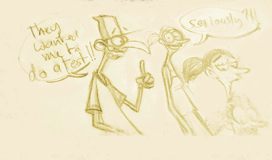
Even if Epic came out in 2013 and most of those screenshots might be outdated, I still feel they would be of interest for people interested in facial topology and a good resource for a future overall facial topology article and facial rig calisthenics.
Blue Sky topologies are very rare online so I used ChopRig system lead developer Daniel Lima’s showreel for reference. You will see meshes and wireframes from 2019 “Spies in Disguise” and 2013 “Epic”.
A movie based on a game, yeah I know. Has anyone seen Sony’s “Angry birds” movie though? I eventually did!
I wasn’t too excited about it originally but being directed by Clay Kaytis I knew I HAD to see it even with a 46% at the Tomatometer. I was sure the animation would be top notch, served by great visuals (I love the character designs) and a story that would still have some fun gags and it did.
The movie has become a great inspiration for me lately I have to say, it is a lot of fun and unlike most CG movies those days, they didn’t try to cater for a maximum audience and specifically parents of young children.
Here is where I am. I haven’t worked on the feet yet. Two days into it, I just need to adjust some edge loops, get rid of triangles then it will be done. Next is Vitaly then some Brave characters, just because modeling characters is fun!
Ah and some wireframes. The arms are still pretty low polygon.
Ever wondered how dense those Pixar meshes are? I have!
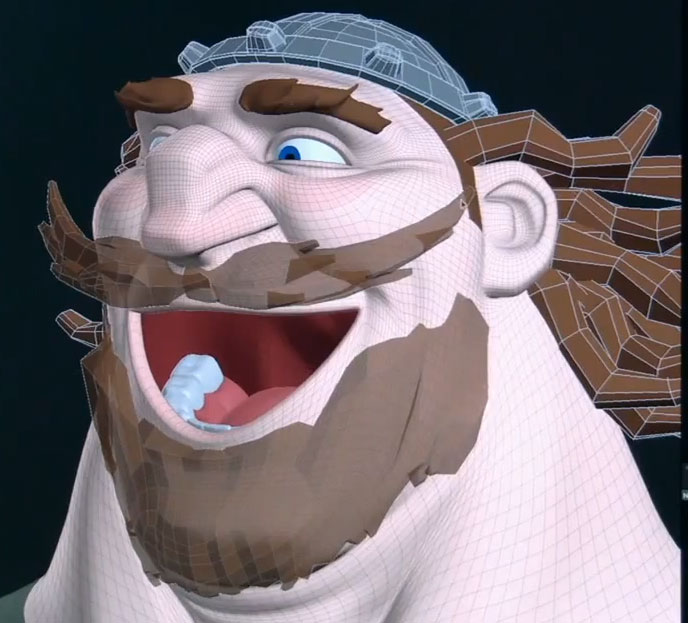
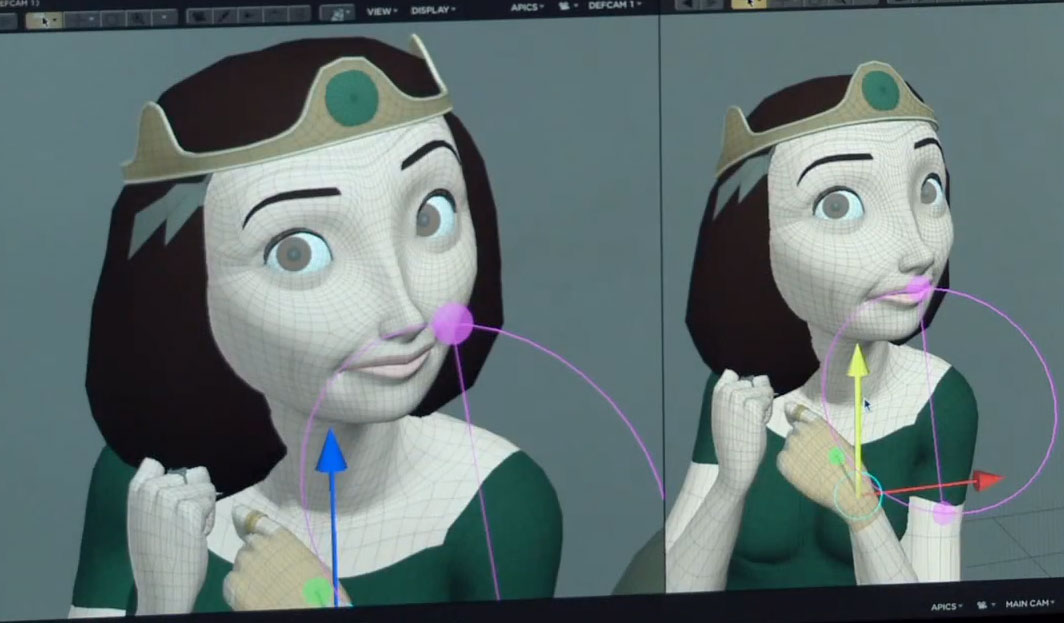
You are in luck, Pixar just released some video footage where we can see the wireframe mesh of both Queen Elinor and King Fergus!
Except the helmet, hair and moustache the mesh is pretty dense. I wonder whether they add one more pass of smoothing at render time though.
Those are probably not the low poly meshes anyway but we can already notice an E pole on the cheeks. This could possibly means Pixar doesn’t use Nurbs surfaces anymore.
Click to zoom in.
And here is the Behind the Scenes video with, 2 minutes into it, Animation Collaborative‘s Michal Makarewicz. (a great school to attend if you are in the San Francisco area or crazy enough to relocate for three month 😉 )
I just came across a really good 3d model review by Dave Gallagher and I found it verry interesting as Dave is giving some really good tips on how to best adapt a 2d concept art into a working 3d model.
It is only 15 minutes but I have never seen anything like that online before. Don’t expect anything technical except at the very end where he talks about adding more edges to the chin to create more volume and the problem it will cause. The video is mainly about translating a 2d concept into 3d and spotting areas that usually get overlooked.
Since animation work is pretty scarce at the moment I have decided to put all my modeling work together just so I can apply to 3d modeling positions.
Those are props for a long overdue short film, personal work, professional work and character design studies. The work was done in Maya 2009 for the most recent pieces, 3ds Max 5 for the rest.
The Pixar related models are obviously fan art as I have never worked on Ratatouille or Brave. I only did those to get a better understanding of Pixar’s character designs, wireframe edge flow and rigging (articulations).
During a recent visit to French sculptor Bourdelle’s museum in Paris, I was reminded it is how the best artists learnt their art, by copying the masters. Michaelangelo was a great source of inspiration for Bourdelle, Daniel Lopez Munoz is mine.
You will probably find a timelapse video for most pieces in the “Related Posts” section at the end of the post and I would suggest their viewing to anyone wanting to learn about CG modeling and clean edge flow or just to see wireframes.
Low polygon modelling, opposed to “high frequency modeling” (the stuff done in Zbrush or Mudbox), is the basics of modelling. Any software can handle that type of work nowadays, from the free Blender to the extremely expensive Maya, 3dsmax or XSI packages.
There are two approaches to low polygon modeling:
1. A top-down approach where you start directly with a square plane whose edges you extrude following the final edge loops.
2. A bottom-up approach where you start modeling from a cube that you gradually subdivide by adding edges or extruding faces.
Both techniques are so simple that they only require a subdivide toggling hotkey (3 in Maya) and a handful of tools which I featured in my ‘Low Polygon modeling tools’ post.
The Edge extrusion method was extensively demonstrated by Kolby Jukes back in the days he used XSI as his primary modeling software. All his videos are offline as he only does Mudbox “High frequency sculpting” nowadays but the Edge extrusion technique is the technique I featured in my latest modeling timelaps video based on Brave’s Lord Macintosh character so have a look at this:
[vimeo]http://vimeo.com/25620952[/vimeo]
If you are not familiar with modeling, what I did here was to put the original concept art on a plane in the background then create a second smaller plane whose edges I extruded following an edge flow mental picture I had. The edge flow being the minimum amount of flowing edges necessary to describe the muscles, skeletal structure or deformation of the surface. Whaooo that was complicated! Well instead of just projecting a grid of edges on the surface of the head, I am creating a minimal amount of edge loops and rings that follow the creases facial expressions will produce. Makes sense?
Bay Raitt was probably the first one to fully demonstrate the Cube approach in that ground breaking 1999 “One afternoon with Bay Raitt” Mirai timelapse video.
This is the one I used in my Rickshaw modeling timelapse video:
[vimeo]http://vimeo.com/6857488[/vimeo]
[vimeo]http://vimeo.com/6825067[/vimeo]
I think the video is self explanatory, if not, post a comment and I will add more explanation in my post
This time I am modeling the hands. I am not looking at references yet, just blocking out the shapes.
You will see me starting from a cube, which I subdivide manually to extrude faces and create the fingers.
I push the details on one fingers then duplicate it to create the other ones. Very often you will see me going from low poly to high poly using the 1 and 3 keys in maya 2009.
and here is the second pass
[vimeo]http://vimeo.com/9924238[/vimeo]
Third pass, refining the shape, cleaning up some edges, adding more detail
[youtube]http://www.youtube.com/watch?v=RNHxU-TFHSM[/youtube]
Here is a video showing the modeling process for my tribute to Pixar’s “Up”.
You can double click to see the video in Full screen but if you first click on the Vimeo logo you will be able to see it in full 1600×1200. You might also be able to download the video from Vimeo, it is in Xvid/Divx, sorry I don’t have Quicktime pro but Virtual Dub or KMplayer allow you to go frame by frame if needed.